FLORIDA HURRICANE BACKUP POWER
Pick your backup power in 30 seconds.
Before the grid goes down:
- Keep phones, Wi-Fi and lights on.
- Choose enough power for your refrigerator if that matters to you.
- Get it home, charged and tested before the storm.
BASIC
Phones + Wi-Fi + lights
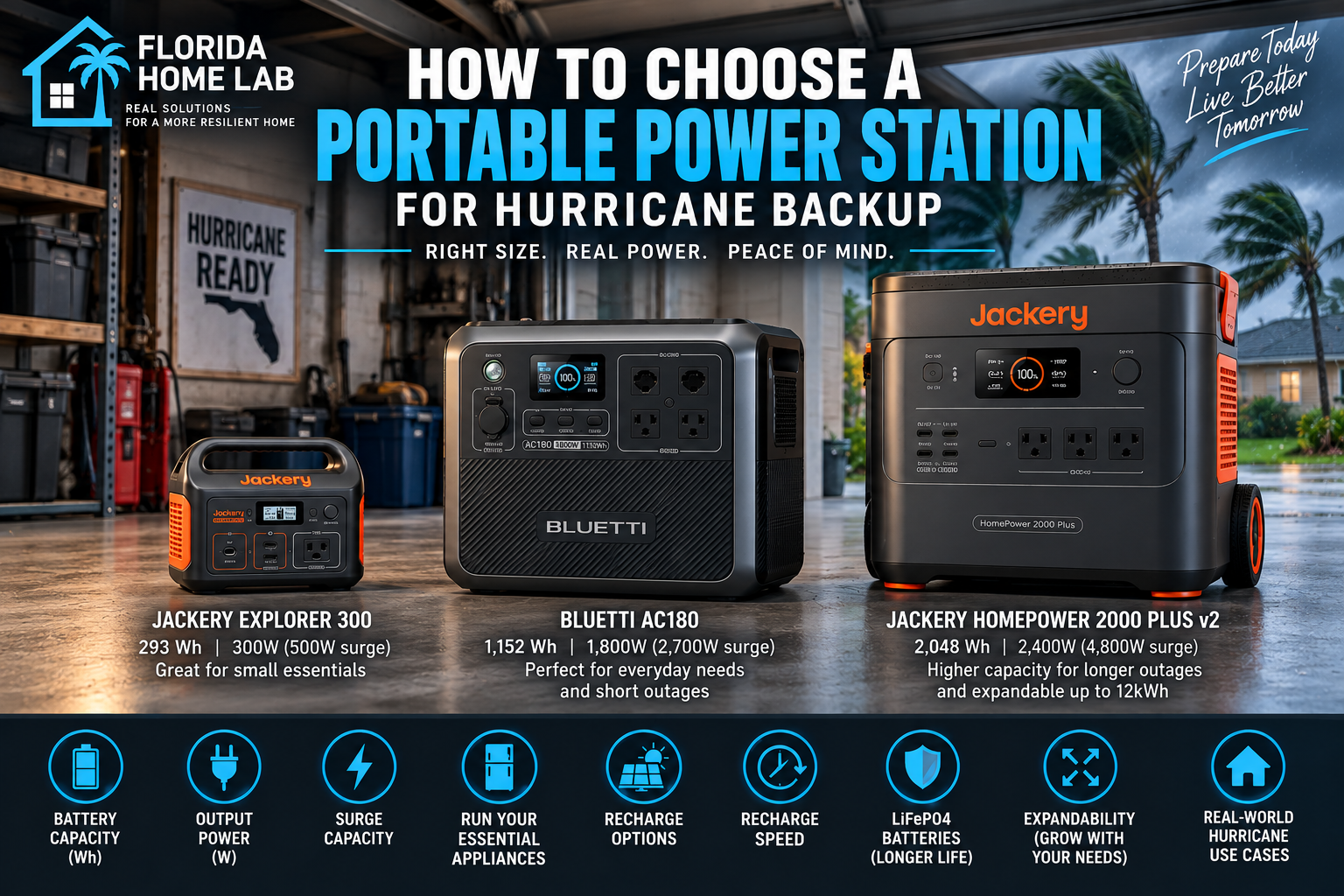
Jackery Explorer 300
293Wh · 300W AC
See Current Price →PRACTICAL STARTING POINT
HOUSEHOLD ESSENTIALS
Refrigerator* + Wi-Fi + lights
BLUETTI AC180
1,152Wh · 1,800W AC
See Current Price →MORE BACKUP
More essentials + room to expand
Jackery HomePower 2000 Plus v2
2,048Wh · 2,400W AC
See Current Price →*Confirm your refrigerator’s running/startup requirements before ordering. Runtime varies by load and conditions.
Need more detail? The rest of this guide explains capacity, output, runtime, recharge options and how to verify your setup before buying.
Research note: Florida Home Lab has not personally tested the products in this guide. Product examples use published manufacturer specifications. Verify current specifications and compatibility before purchase.
Affiliate disclosure: This page contains Amazon affiliate links. As an Amazon Associate I earn from qualifying purchases, at no additional cost to you. See the Affiliate Disclosure.
Compare the three options
| Goal | Example | Capacity | AC output | Best fit | |
|---|---|---|---|---|---|
| Stay connected | Jackery Explorer 300 | 293Wh | 300W | Phones, lights, Wi-Fi and other low-draw devices. | Price → |
| Household essentials | BLUETTI AC180 | 1,152Wh | 1,800W | Selected household loads when you want substantially more flexibility. | Price → |
| More serious backup | Jackery HomePower 2000 Plus v2 | 2,048Wh | 2,400W | More stored energy, more output and room to expand later. | Price → |
1. Start with what you actually need to power
Write down the equipment you consider essential during an outage: phones, lights, internet equipment, fans, refrigeration, medical equipment or other loads specific to your household. Check each device's label or manufacturer documentation rather than relying on generic wattage charts when making a purchase decision.
If you are still deciding between a battery system and a fuel-burning generator, start with our portable power station vs generator guide.
2. Understand watts versus watt-hours
Watts (W) describe power at a point in time. A power station's continuous AC-output rating needs to accommodate the loads operating together. Some appliances also have a higher startup or surge requirement.
Watt-hours (Wh) describe stored energy. A 2,000Wh battery contains roughly twice the nominal stored energy of a 1,000Wh battery, but actual appliance runtime will be lower than a simple capacity-divided-by-load calculation because conversion losses, standby consumption, temperature and appliance cycling affect real-world results.
Useful planning formula: nominal runtime ≈ battery watt-hours ÷ average load in watts. Treat the result as a starting estimate, not a guaranteed runtime.
3. Check continuous output and surge capability
Capacity alone does not determine whether a power station can run an appliance. The inverter also has to support the load. Check continuous AC output and, for equipment with motors or compressors, the manufacturer's surge or startup capability.
This distinction matters with refrigerators, pumps and air-conditioning equipment. Do not assume that a large battery automatically supports a large appliance.
4. Decide how much battery capacity you need
A small station can be useful for communications, lights and other modest loads. Moving into roughly the 1kWh class opens more options for selected household equipment, while 2kWh-class and expandable systems provide substantially more stored energy. The correct class depends on your own load list and outage plan.
Three capacity classes to compare
Small essential-electronics backup
Jackery Explorer 300
293Wh · 300W AC · 500W surge
Jackery lists the Explorer 300 at 293Wh with a 300W inverter. This class is better matched to modest electronics and other loads that remain within its output limit than to high-wattage household appliances.
View on Amazon →Mid-size portable backup
BLUETTI AC180
1,152Wh · 1,800W AC
BLUETTI specifies a 1,152Wh LiFePO4 battery, 1,800W total AC output and up to 500W solar input. This illustrates the step from small electronics backup into a larger portable class.
View on Amazon →Larger expandable backup
Jackery HomePower 2000 Plus v2
2,048Wh · 2,400W AC · expandable to 12kWh
Jackery specifies 2,048Wh capacity and 2,400W output, with supported expansion up to 12kWh. This represents a larger class for homeowners planning more substantial battery backup.
View on Amazon →Amazon links above are affiliate links. Specifications and availability can change; verify the exact current model and manufacturer documentation before purchase.
5. Build the recharge plan before hurricane season
A battery is only as useful during a long outage as your ability to replenish it. Compare the charging methods supported by the exact model: grid AC before the storm, compatible solar input, vehicle charging and any other manufacturer-supported source.
Do not treat a solar-input rating as guaranteed hurricane-day production. Actual solar charging depends on panel capacity, orientation, shading, cloud cover and usable daylight. The practical question is how much energy your setup can reasonably put back into the battery each day under imperfect conditions.
6. Battery chemistry and cycle life matter
Battery chemistry can affect cycle life, weight and other characteristics. Many newer larger power stations use lithium iron phosphate (LiFePO4/LFP). For example, BLUETTI identifies the AC180 as LiFePO4, and Jackery identifies the HomePower 2000 Plus v2 as an LFP system. The older Explorer 300 uses an NCM lithium-ion battery, according to Jackery's current support documentation.
Compare the manufacturer's stated cycle-life conditions rather than assuming every lithium battery has the same longevity.
7. Expandability can change the purchase decision
If you expect your backup needs to grow, check whether the system accepts manufacturer-supported expansion batteries and exactly which versions are compatible. Expansion can let you start with a smaller configuration and add stored energy later, but it can also lock you into a specific product ecosystem.
8. Think carefully about air conditioning
Air conditioning is a demanding hurricane-backup load. A small window unit, portable A/C and central HVAC system have very different electrical requirements. Check the exact equipment data, including startup demand where applicable, against the power station's output and available energy.
Even when a power station can start an air conditioner, runtime can be the limiting factor. High-wattage loads consume a finite battery quickly.
9. Portability still matters
More battery capacity generally means more equipment to move. If your plan requires carrying the unit between rooms, loading it into a vehicle or repositioning it for charging, check the actual weight, dimensions, handles or wheels before buying.
A practical Florida hurricane approach
- List essential outage loads.
- Record running watts and startup requirements.
- Estimate how many hours each load must operate.
- Choose enough continuous output for simultaneous loads.
- Choose enough battery capacity for the desired runtime.
- Plan how the battery will be recharged after the grid fails.
- Check battery chemistry, cycle-life terms and expansion compatibility.
- Verify the final plan against current manufacturer specifications.
Where a generator still fits
A battery power station does not automatically replace a generator. During prolonged outages, a fuel-burning generator can provide sustained energy as long as fuel is available. Some homeowners may prefer a hybrid strategy. If you use a portable generator, current CPSC guidance says it must be operated outdoors only, at least 20 feet from homes and buildings, with exhaust directed away from windows, doors and vents.
For the generator side of the decision, see What Size Generator Do I Need for a Florida Home? and Dual-Fuel vs Tri-Fuel Generator for a Florida Home.
Sources
- U.S. CPSC — 2026 hurricane-season generator safety
- BLUETTI — AC180 specifications
- Jackery — Explorer 300 specifications
- Jackery — HomePower 2000 Plus v2 specifications
This is a research-based buying guide, not a claim of first-hand product testing. Follow the manufacturer's safety, charging, storage and operating instructions for the exact equipment you purchase.